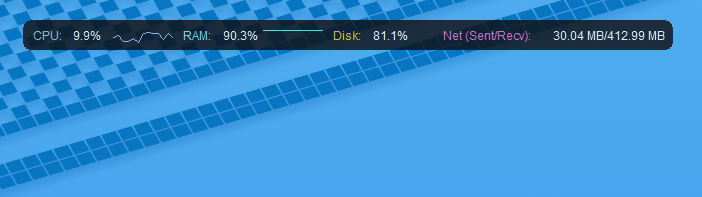
A lightweight Python desktop application that provides a clean, unobtrusive overlay displaying essential hardware and network telemetry at the top of your screen.
Core Features
- Live Resource Telemetry: Real-time monitoring of CPU usage, RAM consumption, disk read/write activity, and network bandwidth.
- Unobtrusive Overlay: Positioned along the screen edge to provide at-a-glance performance stats without obscuring active work windows.
- Modern UI Styling: Built with CustomTkinter for sleek dark and light mode aesthetics.
- Cross-Platform: Runs on both Linux and Windows environments.
Installation & Usage
# 1. Clone the repository
git clone https://github.com/EvickaStudio/system-monitor.git
cd system-monitor

# 2. Set up virtual environment
python -m venv venv
source venv/bin/activate  # On Windows: venv\Scripts\activate

# 3. Install dependencies
pip install -r requirements.txt

# 4. Launch overlay
python -m system_monitor.main
License
Distributed under the GPL-3.0 License.